Currently, Raspberry Pi OS uses debian repository as its main system package source, while the raspberrypi repository provides Raspberry Pi-specific packages, such as kernel modules, firmware, and related components.
APT source configuration files are located under /etc/apt/sources.list.d, and they use the DEB822 format.
Edit debian.sources to add TUNA mirror:
1
2
3
4
5
Types: deb
URIs: https://mirrors.tuna.tsinghua.edu.cn/debian/
Suites: trixie trixie-updates
Components: main contrib non-free non-free-firmware
Signed-By: /usr/share/keyrings/debian-archive-keyring.pgp
And edit raspi.sources to add TUNA mirror:
1
2
3
4
5
Types: deb
URIs: https://mirrors.tuna.tsinghua.edu.cn/raspberrypi/
Suites: trixie
Components: main
Signed-By: /usr/share/keyrings/raspberrypi-archive-keyring.pgp
Then, run sudo apt update to refresh the packages indexes.
As for raspbian repository, it is a Debian-derived repository historically used by 32-bit Raspberry Pi OS. It is not needed for current 64-bit Raspberry Pi OS images based on Debian 13 trixie.
Recently I have been developing a low-code application with Microsoft Platform, chosen SharePoint List as my data support. However, when I share the App to other users, the App will raise a pop-up window requesting the permission for accessing SharePoint List.
Install PowerShell Module
Open PowerShell with administrator right and execute the command below to install module required:
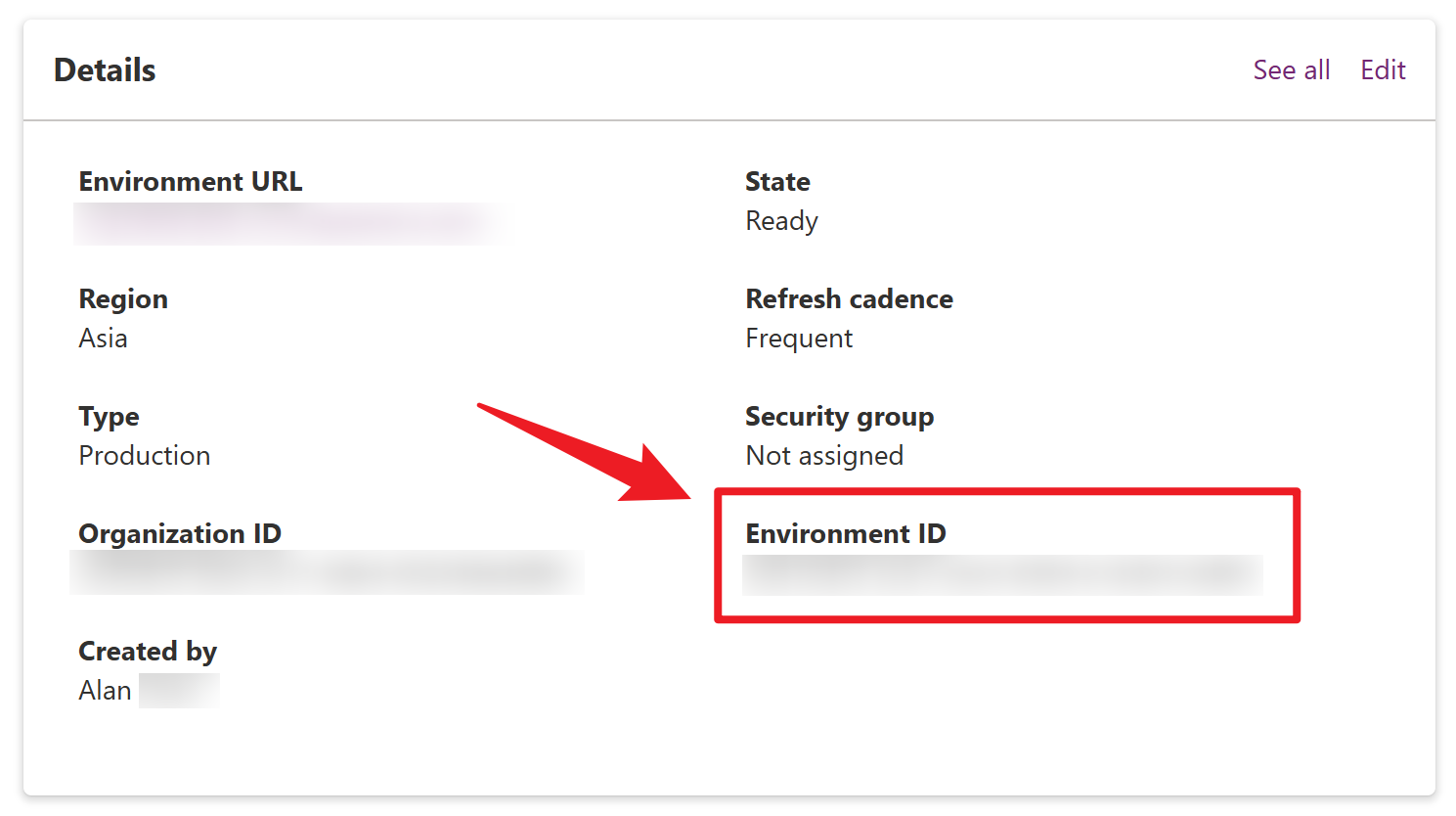
Login Power Platform admin center with your organization’s account, and find the Environment ID of the app deployed. Then, find the App ID from the detail view of the app.
Set Bypass the Consent
Finally, run the command below to set bypass the consent:
Recently, I try to manage the documents, papers and references with Zotero. To keep my libraries updated between my devices and multi platforms, I decide to set up my Raspberry Pi (using Raspberry Pi OS) as an WebDAV server.
If you are in a Linux environment such as Ubuntu, the steps for configuration are similar.
Step 1: Install Apache2 and enable WebDAV module
Firstly, we need to install Apache Web server to enable WebDAV file sharing:
1
sudo apt install apache2
And enable WebDAV module with the directive following:
1
2
sudo a2enmod dav
sudo a2enmod dav_fs
Step 2: Create the directory for WebDAV
We will organize the documents files within the folder we created:
1
sudo mkdir /var/www/webdav
Remember to set the owner and group of the directory to apache’s user and group, granting permission to www-data:
1
sudo chown www-data:www-data /var/www/webdav
Step 3: Configure Apache Host
Add the following directives inside the <VirtualHost> tags in the file /etc/apache2/sites-available/000-default.conf:
1
2
3
4
5
6
7
8
Alias /webdav /var/www/webdav
<Location /webdav>
    DAV On
    AuthType Basic
    AuthName "WebDAV"
    AuthUserFile /etc/apache2/webdav.users
    Require valid-user
</Location>
Step 4: Create user for WebDAV
Use the htpasswd utility to create a user for WebDAV accessing:
If you encounter some error message like below when restarting apache.service:
1
Address already in use: AH00072: make_sock: could not bind to address...
Please check the processes or services listening on the port that Apache is configured to use.
We can open Web browser and type http:/server_ip_or_domain/webdav to check the connection and WebDAV availability. Enter the user and password in the pop-up window, then you will access the directory we created.
Finally, Zotero could synchronize the documents with the local server at a fast speed. (树莓派吃灰属性 -1 😆)
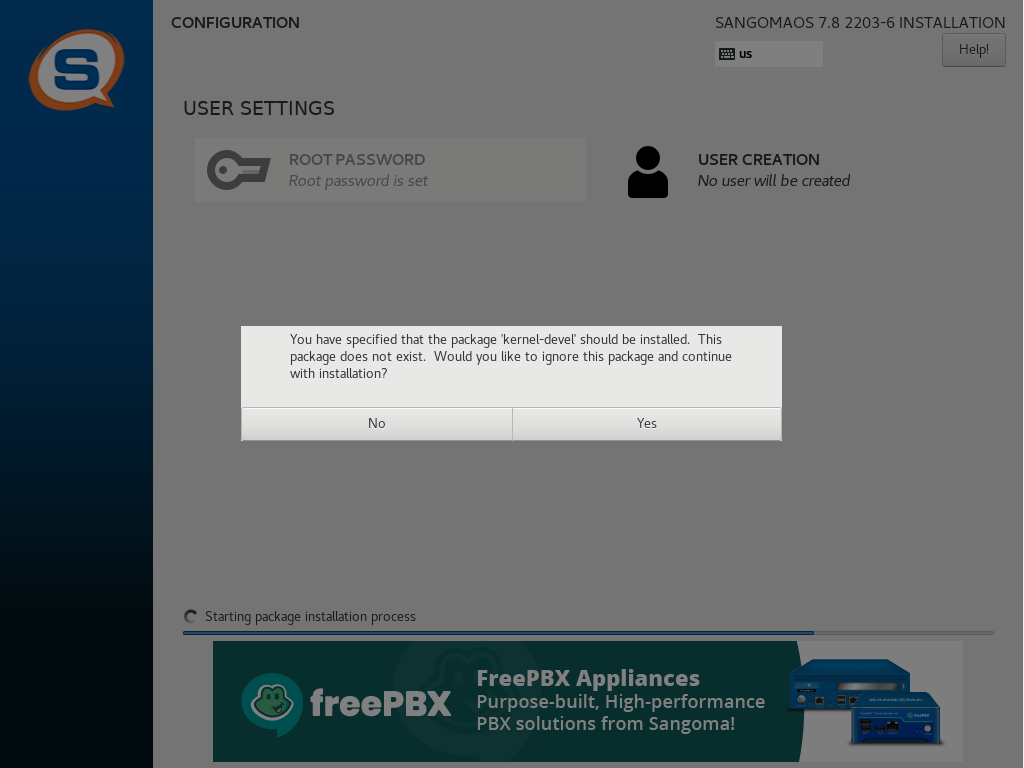
When I install FreePBX in Vmare Workstation Player with the ISO image STABLE SNG7-PBX-64bit-2203-2 downloaded from FreePBX Official website, it raised an error message like screenshot below.
You have specified that the package ‘kernel-devel’ should be installed. This package does not exist. Would you like to ignore this package and continue with installation?
Regardless of whether Yes or No is clicked, the installer will be terminated, entering a black screen with a blinking cursor.
Solution
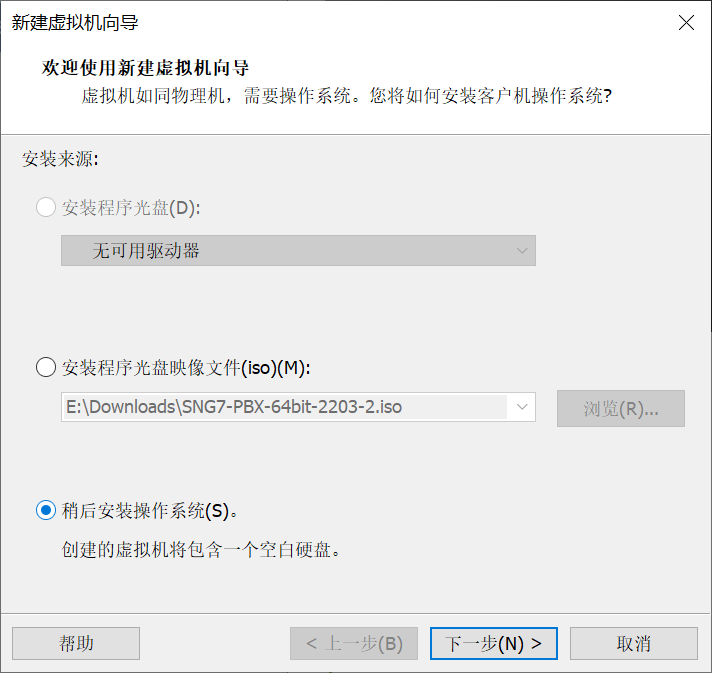
FreePBX ISO should not be setup with Easy Install in Vmware Workstation Player. So please select the option I will install the operating system later in the wizard.
Vmware will detect CentOS 7 in the image. After that, you should be able to install FreePBX properly.
更改 Active Directory 域控制器的计算机名称,一般不应该从 Windows 的设置应用中,直接使用”重命名这台电脑“按钮进行修改。也不应该从”系统属性“面板中,点击”更改“按钮来重命名计算机。因为这可能会造成各种问题,例如造成计算机属性和 AD 数据库中的信息不一致,导致在下次登录服务器时:
The SAM database on the windows server does not have a computer account for this workstation trust relationship.
根据 Mozilla 的 MDN 文档1中关于 BFC(Box Formatting Content,块级格式化上下文)的说明:
A block formatting context is a part of a visual CSS rendering of a web page. It’s the region in which the layout of block boxes occurs and in which floats interact with other elements.
…
Formatting contexts affect layout, but typically, we create a new block formatting context for the positioning and clearing floats rather than changing the layout, because an element that establishes a new block formatting context will:
Both examples are ill-formed in C++. If a compiler does not diagnose the latter, then it does not conform to the standard.
…
You use a language extension that allows runtime length automatic arrays. But does not allow runtime length static arrays. Global arrays have static storage.